Use the Excel or CSV file you already have.
EXCEL & CSV → DASHBOARD + REPORTNo dashboard buildingKPIs and visuals generated for you
Turn Excel and CSV data into dashboards, insights and professional reports — automatically.
Upload your business data and Data Studio checks its quality, finds important patterns, builds KPIs and visualisations, and creates a shareable analysis — without formulas, dashboard setup or BI development.
XExcel & CSVUpload existing business data
✓Quality checksSpot issues before analysis
▣Privacy-firstSource files are not intentionally persisted
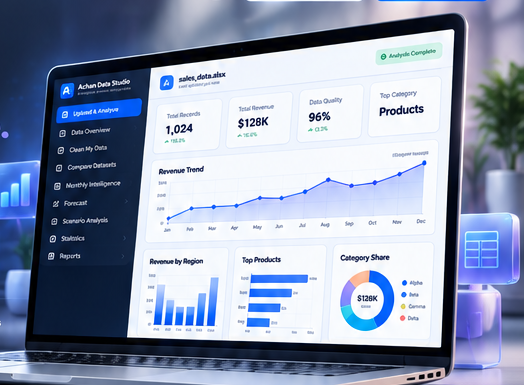
From spreadsheet to decision-ready analysis
A simple workflow for people who need answers from Excel or CSV data without building an analytics solution first.
Profile structure, quality and analysis readiness.
Generate KPIs, charts, patterns and insights.
Create a professional output ready to share.
WHY DATA STUDIO?
Built for people who work in Excel but do not want to build analytics from scratch.
Small businesses, managers, finance and operations teams, and analysts often already have the data. The time-consuming part is cleaning it, choosing the right metrics, building visuals and turning the result into something decision-ready.
Data Studio profiles the file and calculates useful KPIs from the fields it finds.
Get an immediate analytical view before deciding whether a custom BI solution is even needed.
The workflow is structured around data quality, analysis, comparison, forecasting and reporting.
Move from raw spreadsheet to dashboard and professional report in one workflow.
Designed for Excel-first teams:Small businessesManagersFinanceOperationsSalesAnalysts
Powerful analytics, all in one place
Start with a quick analysis, then move into quality, comparison, forecasting, statistics and reporting when the question requires it.
Analyse a Dataset
Instant insights and automatic dashboards.
Clean My DataFind and fix common data-quality issues.
Compare Datasets
Find differences between two datasets.
Monthly Intelligence
Track trends and monthly performance.
ForecastProject future trends using your data.
Scenario Analysis
Test different scenarios and assumptions.
StatisticsExplore metrics, distributions and relationships.
Reporting Studio
Create professional reports ready to share.
PROFESSIONAL REPORTS
Analysis that is ready to share.
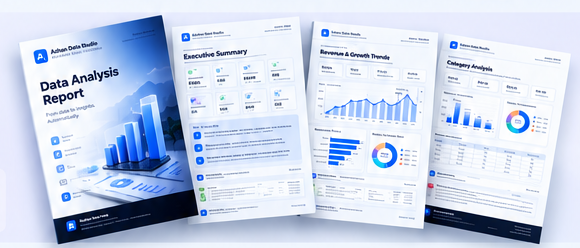
Generate professionally designed reports with KPIs, insights, charts and recommendations. Use them for business reviews, stakeholders and clients without rebuilding the analysis in another tool.
Need reports under your own company brand?Company-branded and white-label reports are available with your own name, logo and report identity. Contact Azhan →
DATA PRIVACY & TRUST
Your spreadsheet should not become the product.
The current analysis API reads uploaded source files in memory and does not intentionally write them to persistent server storage. Uploaded dataset contents are not sent to an LLM by the current analysis engine.
✓ In-memory source-file processing✓ No LLM receives uploaded dataset contents✓ GA4 excludes dataset contents by designRead the full data-handling policy →
Use cases across every business
If your team works in Excel or CSV, Data Studio can help turn that data into a structured analytical view.
Sales & Revenue
Track performance, find trends and forecast growth.
Operations
Identify bottlenecks, patterns and improvement opportunities.
Inventory
Monitor stock levels, compare periods and plan ahead.
Finance
Analyse financial data, track costs and evaluate scenarios.
Customer Data
Understand customers, segmentation and behaviour.
Business Performance
Combine metrics to get the bigger picture.
FREE TODAY · PRO NEXT · CUSTOM NOW
A clear path from self-service to premium support.
Use the core product free. Join the Pro waitlist if you want saved workspaces and premium capabilities, or contact Azhan for custom dashboards, white-label reporting and workflow automation.
Analyse Excel/CSV files, check quality, explore dashboards and generate standard reports.
Analyse My Data Free →Saved analyses, premium reports, higher limits and future AI / automation features.
Join the Waitlist →Custom dashboards, white-label reports, tailored analysis and workflow automation.
Discuss Your Requirement →DATA STUDIO PRO — COMING SOON
Go further when Data Studio becomes part of your regular workflow.
Pro will be shaped by real usage and waitlist demand rather than locking users into accounts before the value is clear.
Join the Pro Waitlist →and history
reporting
automation
usage limits
Learn and explore
Practical guides to help you get more value from spreadsheet data.
How to analyse Excel data online
Step-by-step guide to get insights from your spreadsheet data.
How to check Excel data qualityFind and fix common data issues in your files.
How to create a dashboard from ExcelTurn your data into interactive charts and dashboards.
How to compare Excel filesQuickly identify differences between two datasets.